 Floorwake
You want to work out, but your willpower keeps losing.
Floorwake makes you do it.
Do the push-ups. Then the alarm stops.
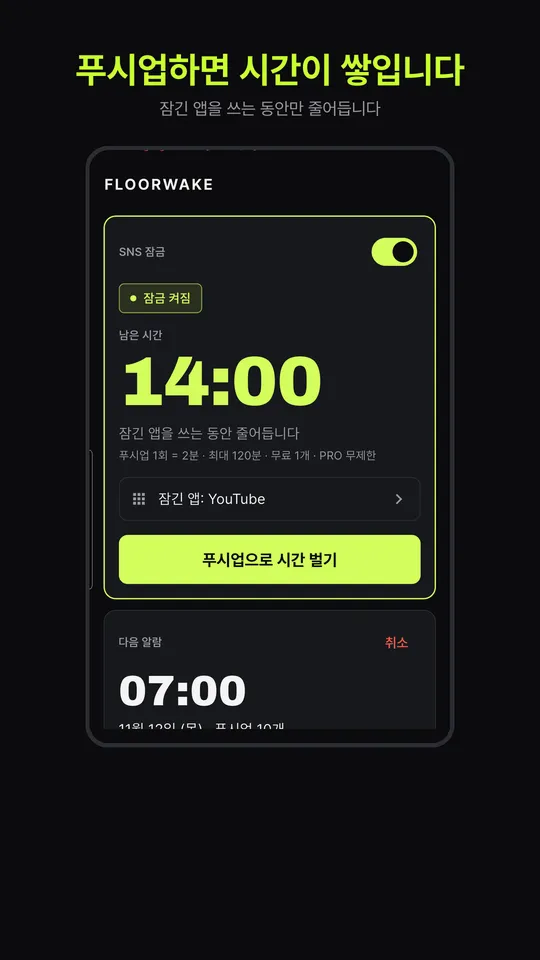
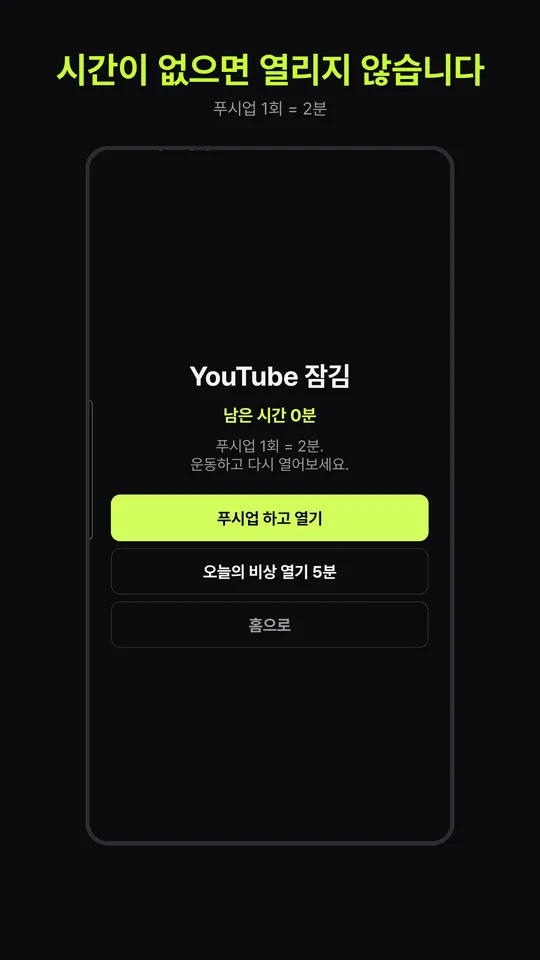
You said "starting tomorrow" again, didn't you? Floorwake does not trust your willpower. It locks YouTube instead. No push-ups, no Instagram.
- Free to start
- No account
- Android 7.0+ · iOS 16+
- Camera video never leaves your phone
You have already made the decision many times
What is missing is not resolve. It is enforcement. Start by admitting that.
You, so far
- You dismiss the alarm and go back to sleep.
- "One short video before my workout" turns into an hour.
- You install a fitness app and never open it.
- You left it to willpower. Willpower lost every time.
You, with Floorwake
- The alarm stops only after you finish your push-ups.
- Locked apps open only for as long as your push-ups earned.
- The camera does the counting. Excuses do not work in front of it.
- No other option left, so you do it.
How it works: three steps
Open it for the first time and you can follow along right away.
- 01
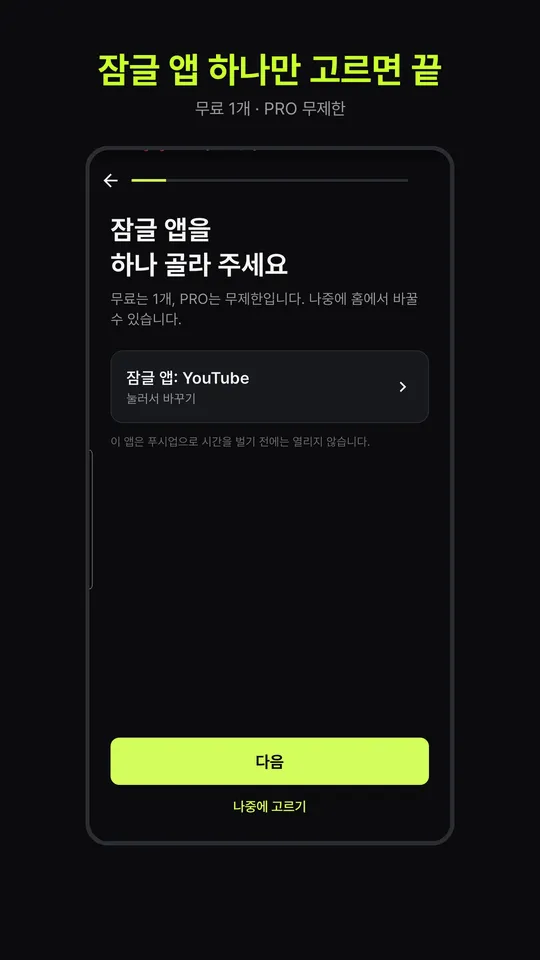
Pick the apps you want to cut
Instagram, YouTube, short videos. You name the apps your thumb goes to first. Only the apps you pick get locked.
- 02
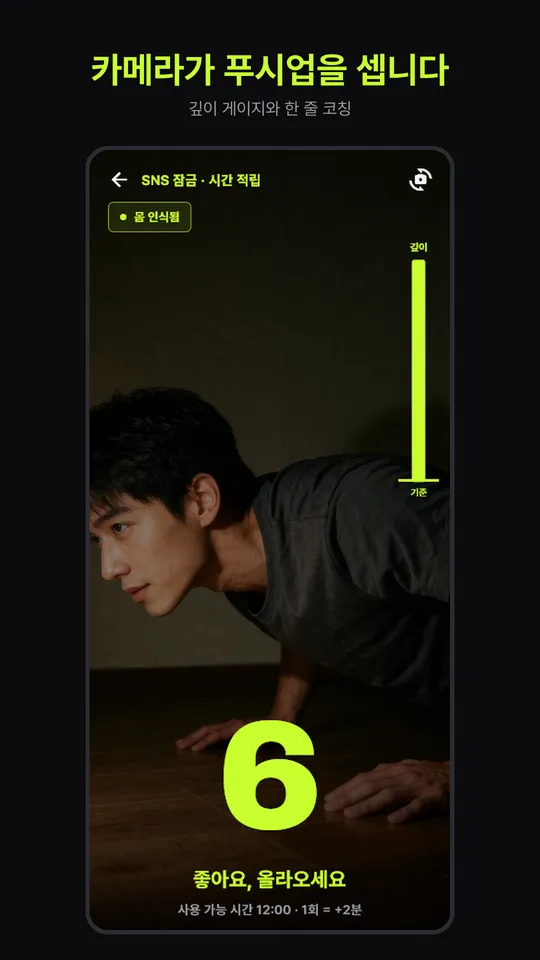
Push-ups in front of the camera
Prop your phone on the floor or against a wall. The front camera counts each rep and calls out bad form on the spot.
- 03
Spend only what you earned
1 push-up = 2 minutes, up to 120 minutes. When the time runs out, the app locks again. On Android, time only runs down while a locked app is open. On iPhone, the app locks again once your earned time has passed.
Features you will not be able to avoid
Only what is actually in the app.
A count that checks your form
It tracks the angles of your shoulders, elbows and torso. Reps where you do not go low enough, or where your body sags, are not counted, and the app tells you right away: "Lower. Go deeper." Results can vary with lighting and phone placement.
Four difficulty levels
From very easy to hard. Showing only your upper body on screen is enough for a rep to count. There is no longer an excuse you can use.
An alarm you cannot snooze through
Set the days, the time and the number of reps. The alarm stops only after you hit that number. Emergency stop is available once every 7 days.
Alarm is free, app lock is PRO
The push-up alarm and camera counting are free. Locking social and video apps and the 30-day history graph are PRO. On Android, the lock includes a 5-minute emergency open, once per day, for the day you really need it (not available on iPhone).
Ads
The free version shows ads (Google AdMob): a banner at the bottom of the home screen and a full-screen ad when you return home after finishing the alarm mission (at most once a day). None on the ringing alarm, mission, completion or lock screens. PRO has no ads.
Gear picks
Some screens show workout gear links. As a Coupang Partners affiliate, we earn a commission from qualifying purchases.
We do not take your camera video or screen content
Camera video is not stored and not sent off your device. On Android, the lock only checks the name of the app in the foreground. On iPhone, it runs through Apple Screen Time, so even Floorwake cannot tell which apps you chose. It does not read on-screen text or what you type. No account sign-up. Ads in the free version (Google AdMob) do share the advertising ID, IP address (approximate location), ad interactions and diagnostics with Google. Details are in section 8 of the Privacy Policy.
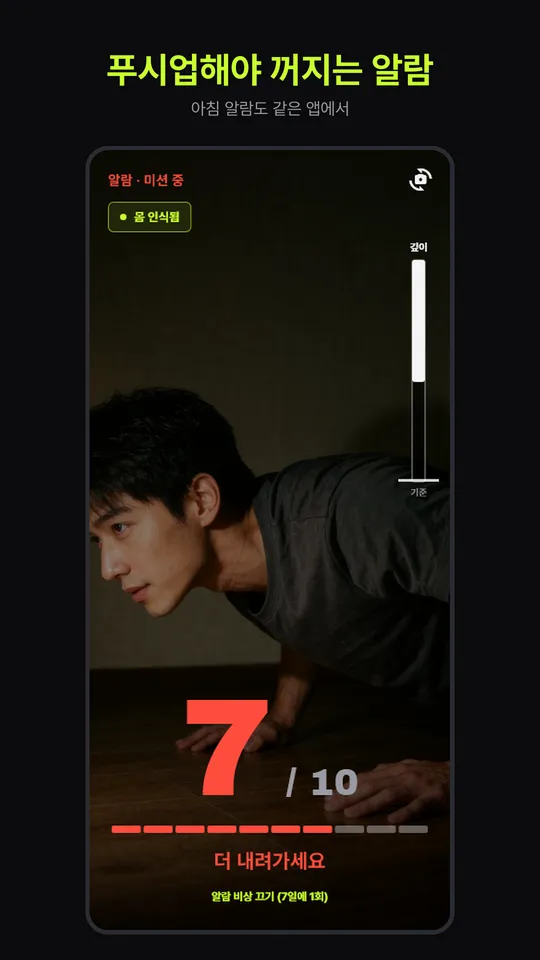
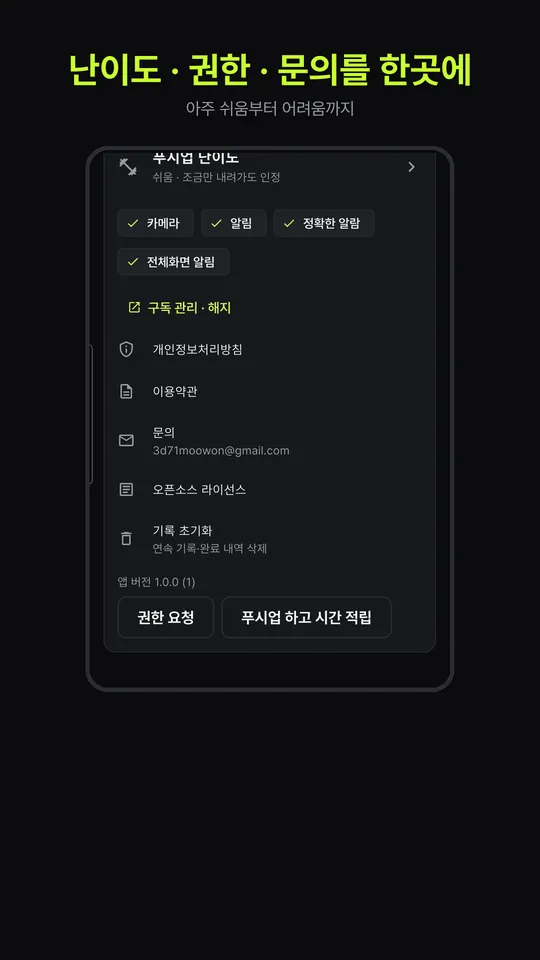
Screenshots show the Korean interface. The app itself is available in Korean and English.
Pricing: it is free to start. Out of excuses now
Start with the alarm for free. If you want to block the apps your thumb goes to first, that is PRO.
Free
- Push-up alarm that stops only after your reps
- Camera push-up counting
- Workout history
- Includes ads
PRO Monthly
- Monthly subscription, billed after the trial
- Lock social and video apps, any number
- 30-day history graph
- No ads
PRO Annual
- Annual subscription, billed after the trial
- Lock social and video apps, any number
- 30-day history graph
- No ads
PRO Lifetime
- Pay once, keep it
- Lock social and video apps, any number
- 30-day history graph
- No ads
Prices are shown in Google Play and may vary by country. You can cancel a subscription at any time in Google Play or in your iPhone Settings. If you cancel during the 7-day free trial, you are not charged. The price shown in the store at release takes precedence.
No excuses. Questions only.
Why does Floorwake need the accessibility permission? (Android)
To know when a locked app has been opened so it can show the lock screen. It only checks the name of the app currently in the foreground. It does not read on-screen text, what you type, or messages. The app explains this and asks for your consent before use, and you can turn it off at any time in your device settings. It is used only for the app limits you set yourself.
How does the lock work on iPhone?
It uses Apple's Screen Time permission. You pick the apps to lock in the iPhone app picker, and the list is passed only in a form Apple keeps unidentifiable, so even Floorwake cannot tell which apps you chose. App usage is never sent to a server. You can turn the Screen Time permission off at any time in iPhone Settings.
Where does my camera video go?
Nowhere. Pose detection runs entirely on your device, and video is neither stored nor sent. Your alarm settings, history and locked-app list are also stored only on your device. Details are in the Privacy Policy.
Can I get around the lock by force-stopping the app?
No. On iPhone the lock is held by Apple Screen Time, so closing the app changes nothing. On Android the lock is held by your device's accessibility service, not by the app screen. Some devices' battery savers do switch the service off, so exclude Floorwake from battery optimization in your device settings. If you turn the accessibility service off yourself, the lock does not work. That also means it is a limit you set and can lift at any time. Not turning it off is up to you.
My alarm does not ring.
Check your device's alarm permission, battery optimization exclusion and Do Not Disturb mode first. If it still fails, email [email protected] with your device model and Android version. On days with something important, also set your device's default alarm as a backup.
How do cancellation and refunds work?
On Android, cancel under "Payments and subscriptions" in the Google Play app. On iPhone, go to Settings > Apple Account > Subscriptions. Cancel at least 24 hours before the 7-day free trial ends and you are not charged. Refunds follow Google Play's or Apple's refund policy; contact us and we will guide you.
Which devices does it run on?
Android 7.0 or later, or iOS 16.0 or later, with a front camera.
Is Floorwake a medical device?
No. It is not a health diagnosis or treatment tool. Stop right away if you feel pain or dizziness while exercising, and talk to a professional if you are concerned about your health. It is not an app that tells you to overdo it. It is an app that gets you started.
Is the app free? What do I get with PRO?
The push-up alarm and camera counting are free, with ads. PRO adds locking for any number of social and video apps, the 30-day history graph and no ads. PRO is a monthly or annual subscription with a 7-day free trial, or a one-time lifetime purchase.
Not from tomorrow. From now.
Leave it to willpower again? Or make yourself do it?